Stop Treating OCR as Plain Text Recognition: How PaddleOCR Turns PDFs into LLM Ready Data
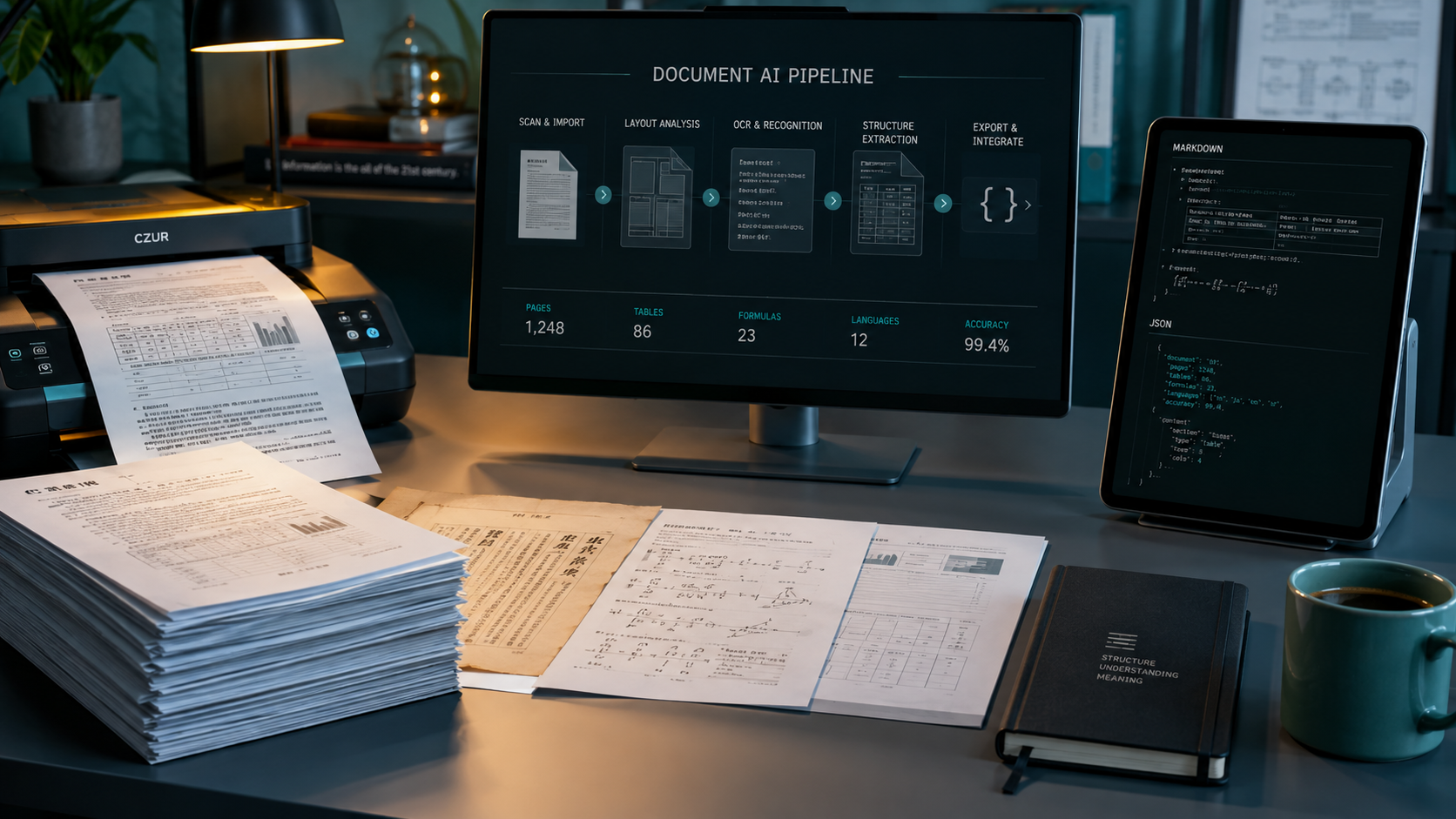
Stop Treating OCR as Plain Text Recognition: How PaddleOCR Turns PDFs into LLM Ready Data
If you have ever connected scanned PDFs to a RAG system, you have probably met the same awkward problem: the text was extracted, but answer quality did not improve. Table columns were split apart, heading levels disappeared, two column reading order was corrupted, and formulas or images became unusable strings. For an LLM, this is not simply a question of whether OCR exists. It is a question of whether the input still preserves the structure of the original document.
In my view, PaddleOCR is interesting because it does not stop at text recognition. The PaddlePaddle team positions it as an OCR toolkit and Document AI engine that converts PDFs and images into structured data, including JSON, Markdown, and Word output. That makes it more than an image to text library. It becomes the data preparation layer in front of RAG, document question answering, and agent workflows.
The short version: it handles the last mile before documents enter an LLM
PaddleOCR covers three common tasks. The first is general OCR: finding and recognizing text in photographs, scans, or natural scenes. The second is document parsing: understanding layouts, tables, formulas, images, and reading order in addition to recognizing strings. The third is vision language model based document understanding, where complex pages can be organized into Markdown or JSON that is closer to how people read them.
The distinction matters. If the goal is to read a few fields from an invoice, a lightweight OCR pipeline may be enough. If the goal is to answer a question such as which gross margin appeared in the fourth quarter table on page two, the system must preserve table coordinates, field relationships, and cross page structure. PaddleOCR lets a team choose a pipeline for the task instead of deploying the heaviest model everywhere.
Four layers of PaddleOCR
1. PP OCR: find the text reliably first
The general OCR pipeline combines document orientation classification, text image unwarping, text line orientation classification, text detection, and text recognition. The first modules can be enabled or disabled for a particular scenario, while detection and recognition form the core path. The current official documentation lists PP OCRv6 as the default model family and provides tiny, small, and medium tiers for different deployment tradeoffs.
This layer is a good fit for search indexing, simple field extraction, scene text recognition, and batch digitization. When the input is a simple single column image, starting with PP OCR is usually the most sensible engineering choice.
2. PP StructureV3: turn layout into usable structure
The hardest part of document question answering is often not that a character was misread. It is that the relationship between characters was destroyed. PP StructureV3 focuses on document layout parsing and can handle headings, paragraphs, tables, formulas, and images while exposing finer coordinate information. The official examples save results as JSON, Markdown, or Word.
For RAG, this layer can be the center of the ingestion pipeline. Keep coordinates, element types, and page numbers in JSON, then generate Markdown chunks according to retrieval needs. This is easier to use for page citations, table reconstruction, heading hierarchy, and error analysis than concatenating every recognized string into one long text field.
3. PaddleOCR VL: handle complex pages and multimodal content
When documents contain complex charts, handwriting, historical material, or tables that span pages, a simple detection and recognition pipeline may not be enough. PaddleOCR VL provides a document parsing oriented vision language model pipeline and can produce JSON, Markdown, and Word output. The official documentation also exposes restructure_pages, which can merge tables across pages, rebuild multi level headings, and concatenate page results.
This is useful after enterprise document ingestion, but it also implies higher model and hardware costs. I would treat it as a higher quality document parsing service, not as the default OCR path for every receipt.
4. Multilingual support, inference engines, and deployment backends
PaddleOCR is not limited to one Python API. The official documentation describes PaddlePaddle, Transformers, and ONNX Runtime inference directions, along with CPU, GPU, and several accelerator options. General OCR can start with the minimal dependency set. Document parsing, information extraction, document translation, and document to Markdown capabilities can be installed through optional dependency groups.
The advantage is that capability selection and hardware selection can be separated. The downside is a larger compatibility matrix. GPU, CUDA, PaddlePaddle, Transformers, and FlashAttention versions can interact in ways that a single pip command does not reveal.
Why is it useful for RAG?
I would place PaddleOCR at the ingestion boundary of RAG, not treat it as a replacement for a vector database. A complete flow can have six stages: receive the PDF or image; normalize orientation and layout; recognize text, tables, formulas, and images; save JSON with page and element metadata; create Markdown chunks from headings and paragraphs; and only then send the result to embeddings, a vector store, and a reranker.
This separation has three practical benefits. First, OCR errors can be traced back to an original page and coordinate instead of being investigated only after an LLM gives a wrong answer. Second, one parsed representation can serve keyword search, vector retrieval, table queries, and human preview. Third, replacing the embedding model or LLM does not require parsing every original document again.
A less discussed benefit is accountable citation. If a chunk keeps its page number, heading path, and table location, the answer can point to a page and region as evidence. This does not eliminate hallucinations, but it gives evaluation, debugging, and human review a concrete anchor.
How to start: build the smallest verifiable path
The official installation guide separates the core paddleocr package from optional capabilities. For basic OCR, start with:
python -m pip install paddleocrFor document parsing, the documented dependency group is doc-parser. For converting Word, Excel, and PowerPoint files to Markdown, consider doc2md. Use all only when the project really needs the complete capability set. Before inference, install PaddlePaddle or another inference engine appropriate to the selected backend.
The following minimal Python example follows the current pipeline API in the official OCR documentation:
from paddleocr import PaddleOCR
ocr = PaddleOCR(
    use_doc_orientation_classify=False,
    use_doc_unwarping=False,
    use_textline_orientation=False,
)
result = ocr.predict("./document.png")
for res in result:
    res.print()
    res.save_to_img("output")
    res.save_to_json("output")
When the goal is document structure rather than plain text, use PP StructureV3:
from paddleocr import PPStructureV3
pipeline = PPStructureV3()
output = pipeline.predict("./document.png")
for res in output:
    res.print()
    res.save_to_json(save_path="output")
    res.save_to_markdown(save_path="output")
    res.save_to_word(save_path="output")
For a quick PaddleOCR VL test, the official documentation provides both CLI and Python APIs. The Python version looks like this:
from pathlib import Path
from paddleocr import PaddleOCRVL
output_dir = Path("./output")
output_dir.mkdir(parents=True, exist_ok=True)
pipeline = PaddleOCRVL()
output = pipeline.predict("./document.pdf")
for res in output:
    res.print()
    res.save_to_json(save_path=output_dir)
    res.save_to_markdown(save_path=output_dir)
The first run needs time for model download and initialization. The official documentation also warns that local quick validation may not meet production requirements for speed, memory, or stability. Production deployment should include model serving, concurrency limits, batch sizing, timeouts, and monitoring.
Five common integration traps
Trap one: treating OCR output as clean data
OCR output is a model inference result, not a verified fact. Low resolution scans, angled photos, stamps, handwriting, table lines, and unusual fonts can all create errors. Build a representative sample set and measure text recognition, table structure, field extraction, and final question answering separately.
Trap two: using one pipeline for every document
A receipt, a two column research paper, a multi page financial table, and a slide deck are different inputs. A classifier can route them to PP OCR, PP StructureV3, or PaddleOCR VL, keeping the more expensive model for pages that actually need it.
Trap three: ignoring model downloads and hardware compatibility
PaddleOCR can fetch official models according to the selected pipeline, but that does not mean a production container should rely on unrestricted internet access. Pin model sources and versions, prefetch or cache the files, and validate the combination of CPU, GPU, CUDA, PaddlePaddle, and inference engine. Do not install mutually exclusive CPU and GPU PaddlePaddle packages together.
Trap four: putting only Markdown into the vector database
Markdown is convenient for reading and initial chunking, but page numbers, element types, coordinates, and table metadata in JSON should not be discarded. Store retrievable text and provenance metadata separately. Let vector retrieval find candidate content, then let the answer layer construct citations and page previews from metadata.
Trap five: replacing your own evaluation with benchmark numbers
The official README and documentation contain model, speed, and benchmark information, but those numbers depend on datasets, hardware, inference mode, and preprocessing. Your documents may have different languages and scan quality. A real golden set with latency, memory, failure rate, and manual correction cost is more useful for a deployment decision.
How I would decide whether a team should use it
If a team already has Python services, needs multilingual document processing, and sees RAG quality suffer on PDFs and scans, PaddleOCR is worth a small proof of concept. Do not begin with the hardest fully autonomous agent. Choose a measurable flow, such as converting supplier PDFs into page aware Markdown and JSON, then compare retrieval hit rate and manual search time before and after.
If the need is only occasional simple text recognition, PaddleOCR may be more infrastructure than necessary. If a team cannot own model serving, hardware compatibility, and document quality governance, it should not replace an existing SaaS merely because the repository has many stars. Open source and deployability are strengths, but they also transfer responsibility for versions, models, resources, and monitoring to the user.
For an implementation focused team, I would treat PaddleOCR as a composable document intelligence building block. It does not complete the RAG system and it does not guarantee correct answers. What it provides is a pipeline from unstructured documents to data that downstream systems can consume. Once that boundary is clear, embeddings, retrieval, citations, and agent tools have a more stable foundation.
Conclusion: fix the input before debating the model
Many RAG projects focus on changing the embedding model, tuning chunk size, or comparing LLMs without first checking whether document structure was lost during ingestion. PaddleOCR is a reminder that Document AI is not a minor utility next to RAG. It is part of the upstream engineering that determines whether knowledge can be retrieved correctly.
I would start with the smallest path: establish a reproducible text recognition baseline with PP OCR, add layout and table information with PP StructureV3, and introduce PaddleOCR VL only for genuinely complex pages. Preserve the original file, model version, page number, output format, and evaluation result at every step. This may look slower, but it is much more reliable than connecting every model to an agent and then debugging the chain through a handful of wrong answers.
References